Unlock and Jailbreak iPhone 3.1.2 baseband 05.11.07 using BlackSn0w (or Blacksnow)
Update: BlackRa1n works with every iPhone and iPod touch model out there. However for some models of iPod Touch, it is still tethered. The steps are almost same for all devices.
Update2: A real fix for WiFi issues (not the usual “Reset Network Settings”) See here: iPhone 3.1.2 Blacksn0w WiFi Fix
Geohot released Blacksnow (or Blacksn0w) for unlocking and jailbreaking iPhone 3.1.2 . The release is working as per his post on his blog. You’ll need a working WiFi or mobile internet connection (data access plan) to install Cydia/Rock/Blacksn0w. Here is the step by step guide to unlock and jailbreak iPhone 3G and 3GS 3.1.2 baseband 05.11.07 using blacksnow (or blacksn0w):

For iPhone 3G and 3GS:
- Update your iPhone to new 3.1.2 firmware directly using iTunes or by using the direct download links and using shift+restore on iTunes. It is better to directly update the device using iTunes. Do not directly update from iTunes.
- Download and install Blackra1n RC3 from http://www.blackra1n.com.
- Run the software to Ra1n your iPhone (Click the “make it ra1n” icon).Takes about 30 seconds to 1 minute.
- After iPhone reboots, open blackra1n.app and you should now see “sn0w”.
- Click “sn0w” to install Blacksn0w. This will Unlock your iPhone 3G, 3GS running 3.1.2 firmware on 05.11.07 baseband.
Important Update: If you are on Windows Vista or Windows 7, then using “Windows XP compatibility mode” may cause the iPhone to hang at recovery mode. If you are getting the same problem, then try using Blackra1n as is- without any compatibility mode. This may solve the problem. (Thanks to AngelB for pointing this out)
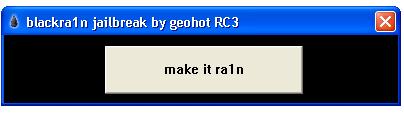

For iPhone 3G and 3GS who previously installed blackra1n:
If you are a loyal blackra1n user who kept the blackra1n.app on your iPhone, run it. You will see Icy replaced by an option “ra1n”. Install this to upgrade your app. After upgrading, run blackra1n.app again. You will see “sn0w”. Install this, and enjoy your unlocked iPhone.
Update: If you’ve previously used Blackra1n but uninstalled it or you’ve used Pwnage tool/Redsn0w to unlock, then you’ll need to install Blacksn0w using Cydia. Use http://blackra1n.com/ as repo.
For iPhone 2G
It works for iPhone 2G too. Follow steps 1-3 above. At step 4, there won’t be any “sn0w” option. Just tap Cydia and/or Rock at this step. Rest of steps remains same.
If you are having any problem or query regarding Blackra1n, Blacksn0w, Jailbreak or any other query, Please ask them in comments. I’ll be glad to help you out
Update: A real fix for WiFi issues (not the usual “Reset Network Settings”) See here: iPhone 3.1.2 Blacksn0w WiFi Fix
For more such updates on iPhone jailbreaking and unlocking, subscribe to technoNix via email or connect with us via our facebook fan page.