Fix WiFi, GPS and YouTube Issues with iPhone 3.1.2 Jailbreaked via Blackra1n (or Blacksn0w)
Blackra1n along with Blacksn0w can jailbreak and unlock all iPhone and iPod models having firmware 3.1.2 and 05.11.07 baseband. We have already covered a guide to Unlock and Jailbreak iPhone 2G/3G/3GS using Blacksn0w. Many users are complaining about WiFi, GPS or YouTube not working after they jailbreak with Blacksn0w. Especially WiFi is causing a lot of problems for users ho recently jailbreaked their iPhones. Here are two possible solutions for this problem. The second one worked for me and I’m finally able to browse using WiFi after 4 months. Here are the two methods:
Method 1- Reset Network Settings:
This is the most common fix. It may or may not work for some people. To apply this fix, do the following:
On your iPhone, goto Settings > General > Reset > Reset Network Settings. You may have to do this for a couple of times.
Method 2- Install Push Fix on your iPhone
This method is a new method. There is an application named “Push Fix” available through Cydia. Note that you’ll need working internet on your iPhone (data plan). Here are the steps:
- Start “Cydia” on your iPhone. Touch on “Manage” tab on the bottom and then on “Sources”.
- Touch on “Edit” and then “Add”. Then enter “http://cydia.pushfix.info” and tap “Add Source”.
- Cydia will automatically update its application database.
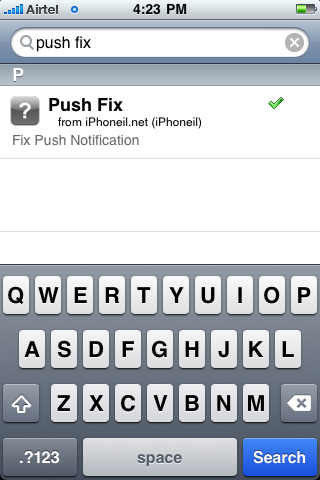
- Now tap “Search” at the bottom of Cydia and search for “Push Fix” .
- Install Push Fix. Restart your iPhone.

Now test your WiFi. It should be working now. Else try restarting again. A couple of restart may fix the issue. Also, if the method stops working after some time, then reinstall the application. It’ll start working again.
Do write out in comments if it works for you (and if it doesn’t) or you need any help.
For more such updates on iPhone jailbreaking and unlocking, subscribe to technoNix via email or connect with us via our facebook fan page.