Control your iPhone, iPad and iPod Touch via an Android Device
Now this might start the evergreen Apple vs Android war… but lets face it. you can actually control an iDevice using your favorite android device, although the reverse is true as well. Both the iPhone and Android must be connected to internet (preferably same WiFi network) and iPhone/iPad/iPod Touch must be jailbroken for this to work. Find the guide below:
- Open Cydia on your iDevice and search for veency
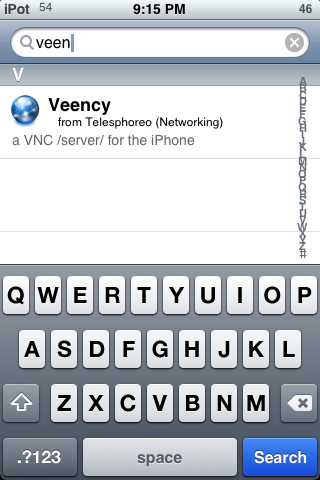
- Install Veency.
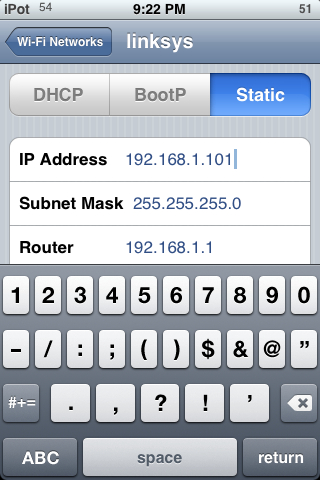
- On your iPhone, goto Settings> WiFi Network and note down your IP Address
- Open your Android device and install android-vnc from market
- Open android-vnc and enter you iPhone address as shown in the screenshot below
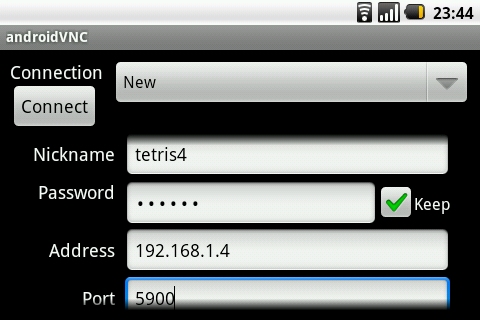
- Press connect. You’ll get a confirmation screen on your iPhone
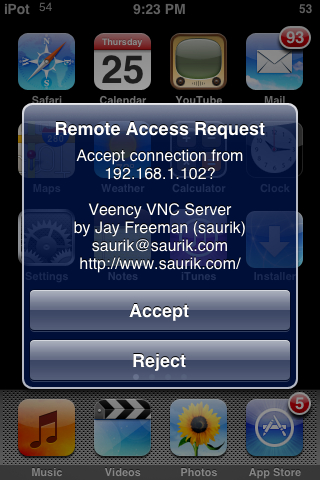
- Voila. You can now control iPhone via your Android.
Let the war begin 🙂
For more such updates on iPhone and Android tips and tricks, subscribe to technoNix via email or connect with us via our facebook fan page.