Jailbreak iOS 5.0.1 untethered for iPhone 3GS, iPhone 4, iPad and iPod Touch (All A4 Devices) using redsn0w 0.9.10
iPhone dev team has released redsn0w 0.9.10 to Jailbreak iOS 5.0.1 untethered for iPhone 3GS, iPhone 4, iPad and iPod Touch (All A4 Devices). For those who don’t know, redsn0w is a windows tool to jailbreak iPhone, iPod Touch and iPad. Here is a short excerpt from dev team blog:
- The untether is for iOS 5.0.1 on iPhone3GS, iPhone4, iPhone4-CDMA, iPad1, iPod touch 3G, iPod touch 4G
- If you have one of those devices and are not on 5.0.1 yet, update now! The SHSH window is still open for 5.0.1 If you unlock via ultrasn0w or gevey, make sure you only get to 5.0.1 via a custom IPSW! Once you’re at 5.0.1, use the latest redsn0w 0.9.10 to both jailbreak and untether.
- If you’re already at 5.0.1 with a tethered jailbreak, you have two choices: either run redsn0w 0.9.10 over your current jailbreak (deselect “Install Cydia” if you do that), or install the Cydia package prepared by the chronic devteam. The patches are the same regardless of which you choose.
- Some of you are using a hybrid 5.0/5.0.1 configuration. If so, do not attempt to install this untether over that setup! You will most likely get into a reboot cycle. Do a sync and fresh restore to 5.0.1 then install the jailbreak + untether.
Here is a step by step guide to Jailbreak iOS 5.0.1 untethered for iPhone 3GS, iPhone 4, iPad and iPod Touch (All A4 Devices) using redsn0w 0.9.10:
The guide is split into three parts:
For Users On iOS 5.0.1 Tethered Jailbreak:
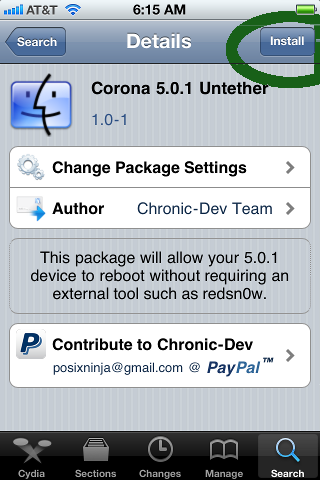
For users already on iOS 5.0.1 tethered Jailbreak, a Cydia package has been developed which can untether iOS 5.0.1. To install, open Cydia and search for “Corona”. Install it and you’ll now have untethered jailbreak.
For users on Stock iOS 5.0.1 which does not require unlock:
- Download Redsn0w 0.9.10 for Mac or Windows: Mac or Windows
- Open RedSn0w 0.9.10 and click Jailbreak
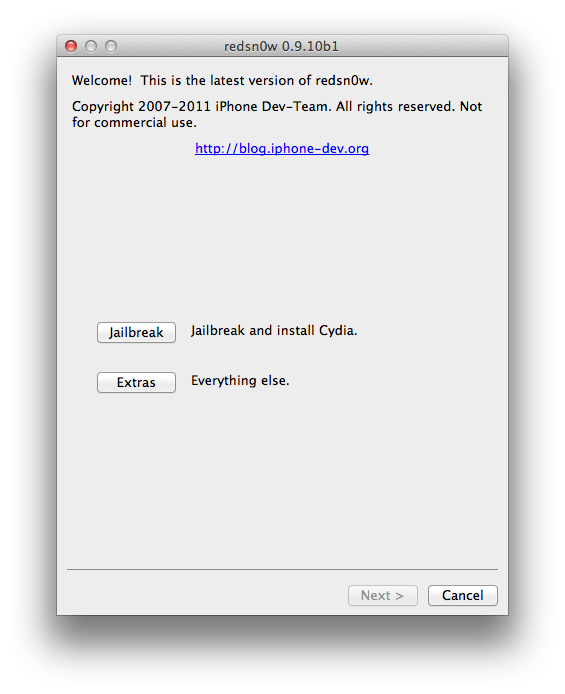
- Now Click “Install Cydia” and follow onscreen instructions to put your device in DFU mode
- Let Redsn0w do its work. Once finished, You’ll have Jailbroken iOS 5.0.1 untethered
For users on lower basebands and iOS versions requiring unlock:
Open Jailbreak. Goto Extras and click “Custom IPSW” feature to make custom “No baseband update” IPSW which can be used to update to iOS 5.0.1 preserving baseband version. Use this tutorial for a step by step guide to unlock iOS 5.0.1 using ultrasn0w: https://www.technonix.com/2011/12/download-ultrasn0w-1-2-5-to-unlock-ios-5-0-1-for-iphone-3gs-and-iphone-4/
Thats it. After following this, you’ll have iOS 5.0.1 untethered on all A4 Devices.
For more such updates on iPhone jailbreaking and unlocking, subscribe to technoNix via email or connect with us via our facebook fan page.