|

Install Flash on iPhone 4, 3GS and 3G using Frash

Adding flash to iPhone 4,3GS or 3G is stupidly simple now. You just need a jailbroken iPhone. Sadly, flash on iPhone is limited to just basic animations. Still if you need it, here are the step by step instructions:

  1. Open Cydia, goto “Manage” and tap on “Sources”.
  2. Tap edit and then tap add.
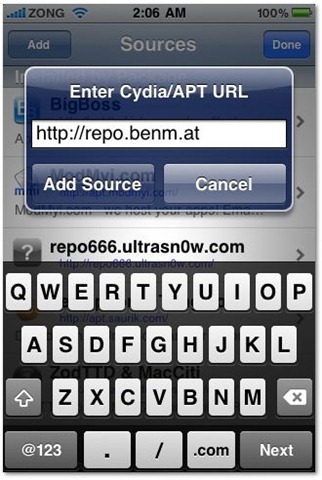
  3. Add http://repo.benm.at and tap “Add source”.install flash frash on iphone 4 3gs 3g
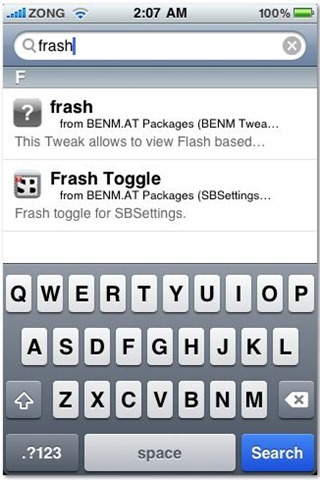
  4. Search “frash” and install it.Frash on iPhone 3G 3GS 4 FLASH

There it is. Enjoy flash on iPhone. 🙂

Related posts:

  1. Ultrasn0w (Ultrasnow) Unlocks iPhone 4, 3GS and 3G on iOS 4.0.1
  2. Get Appsync for iPhone and iPod Touch 3.1.3
  3. Download iOS 4.1 for iPhone 4, 3G, 3GS and iPod Touch 2G and 3G
  4. Unlock and Jailbreak iPhone 2G, 3G, 3GS, iPod Touch 1G and 2G using PwnageTool 3.1.5 on Mac OSX

Similar Posts

Leave a Reply

Your email address will not be published. Required fields are marked *