Download Absinthe to jailbreak A5 devices untethered [Direct Download links available]
iPhone “dream team” finally released the long awaited untethered jailbreak for A5 devices- iPhone 4S and iPad 2. Named as Absinthe, the tool can jailbreak iPhone 4S and iPad 2. While it is only available for Mac right now, Windows version will be coming real soon. The supported devices and firmware for Absinthe are:
- iPhone 4S running iOS 5.0, 5.0.1 (9A405 and 9A406)
- iPad 2 Wifi/GSM/CDMA running iOS 5.0.1
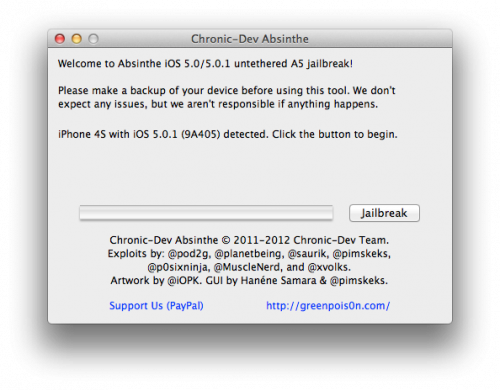
The greepois0n site is heavily loaded right now. However, there are direct download links available for Mac version of Abinthe at the end of this post. As always, here is a step by step guide to jailbreak iPhone 4S and iPad 2 using Absinthe:
- Download Absinthe for Mac from here: http://cache.greenpois0n.com/dl/absinthe-mac-0.1.2-1.zip
- Open Absinthe. Connect your iPhone 4S or iPad 2 and click “Jailbreak”
- You’ll get messages as follows:
“Beginning jailbreak, this may take a while”“Sending initial data” at this time you will notice that “Restoring in Progress” message on your iPhone 4S.”Waiting for reboot”“Waiting for device to finish rebooting” as your iPhone 4S is rebooting.
“Preparing jailbreak data”
“Sending payload data”
- Once done, Absinthe will prompt to unlock your screen, if required. There should be Absinthe app available on iPhone 4S or iPad 2 right now.
- Open Absinthe on your device and it should load greenpois0n on your device. Now reboot you iPhone 4S or iPad and you’ll be able to see Cydia on your homescreen!!
- If the Absinthe webclip shows “Error establishing a database connection”, please go to Settings, turn on VPN and wait instead.
- Toggle VPN only AFTER Absinthe says it’s done, or it will not work.
- VPN SHOULD error and then reboot soon. If it does not, rerun Absinthe!
- If you get a strange problem, we advise you to restore your iPhone with iTunes, if you can (i.e. if you’re not on 5.0 waiting for an eventual 4S unlock).
For more such updates on iPhone jailbreaking and unlocking, subscribe to technoNix via email, Follow @technoNix on Twitter or connect with us via our facebook fan page.